echo $qtyStock = (int) Mage::getModel('cataloginventory/stock_item')->loadByProduct($_product)->getQty();
Monday, October 17, 2011
How to get products available stock quantity in magento?
Here is the code to get produts stock quantity. Place this code in your view.phtml file.

Thursday, October 6, 2011
How to remove validation on zip code in magento checkout page?
Login to your your magento admin panel then go to System -> Configuration->General. From Country option tab you can see there is an option "Postal code is optional for the following countries" Select the country which you want to Optional/Not validate . then click on save config to save your settings.
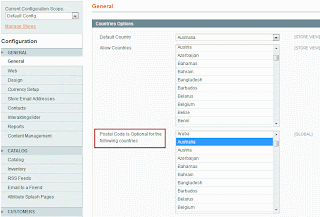
That's it you are done.

That's it you are done.
Tips to use home page url, custom page url and pass query string in Magento CMS Page
{{store url=""}} -> Used to get Store's home page URL.
Resulting in a URL like "http://yourstore.com/"
{{store url="contacts"}} -> Used to get contact us page URL.
Resulting in a URL like "http://yourstore.com/contacts/"
If you want to show custom URL Use direct_url
{{store direct_url="category/subcategory.html"}} -> Used to get custom URL.
Resulting in a URL like "http://yourstore.com/category/subcategory.html"
If you want to pass parameters in query string use _query
{{store direct_url="category/subcategory.html" _query="a=param_a&b=param_b"}} -> Used to Pass query string
Resulting in a URL like "http://yourstore.com/category/subcategory.html?a=param_a&b=param_b"
{{skin url='images/homepageimage.jpg'}} -> Used to get image url
Resulting in a URL like "http://yourstore.com/"
{{store url="contacts"}} -> Used to get contact us page URL.
Resulting in a URL like "http://yourstore.com/contacts/"
If you want to show custom URL Use direct_url
{{store direct_url="category/subcategory.html"}} -> Used to get custom URL.
Resulting in a URL like "http://yourstore.com/category/subcategory.html"
If you want to pass parameters in query string use _query
{{store direct_url="category/subcategory.html" _query="a=param_a&b=param_b"}} -> Used to Pass query string
Resulting in a URL like "http://yourstore.com/category/subcategory.html?a=param_a&b=param_b"
{{skin url='images/homepageimage.jpg'}} -> Used to get image url
Wednesday, October 5, 2011
How to prevent not logged in users from accessing magento site and force customer to login?
Step 1:
Create and put below content to the file named "redirect.phtml" and place under "/template/page/html/".Mage::getSingleton('customer/session')->setBeforeAuthUrl($this->getRequest()->getRequestUri()); //save requested URL for later redirection
if(!Mage::getSingleton('customer/session')->isLoggedIn()) { // if not logged in
header("Status: 301");
header('Location: '.$this->getUrl('customer/account/login')) ; // send to the login page
exit;
}
Step 2:
Edit "page.xml" and place the codeafter
Step 3:
Edit the below files "template/page/"1. 1column.phtml
2. 2columns-left.phtml
3. 2columns-right.phtml
4. 3columns.phtml
and Insert the following line at the start of all the files.
echo $this->getChildHtml('auth-redirect')
Step 4:
Now Add exceptions for home, login and cms page.Edit your "layout/customer.xml"
Add below code
under
Also If you want users to be able to create an account, another good one to make public might be place code under
in "layout/customer.xml"
If you want to make the home (front) page public, add the "remove" code to the
Export Magento categories with ID using php script
Copy the code below into a new file "categorywithid.php" and place this file in your root folder
define('MAGENTO', realpath(dirname(__FILE__)));
require_once MAGENTO . '/app/Mage.php';
Mage::app();

$category = Mage::getModel ( 'catalog/category' );
$tree = $category->getTreeModel ();
$tree->load ();

$ids = $tree->getCollection ()->getAllIds ();

if ($ids) {
 $file = "var/export/catwithid.csv";
 file_put_contents($file,"catId, catName\n");
 foreach ( $ids as $id ) {
   $string = $id . ', ' .$category->load($id)->getName() . "\n";
  file_put_contents($file,$string,FILE_APPEND);
 }
}
Hit Your browser like www.YourDomain.com/categorywithid.php Thats it. You are done. Get the csv file under "var/export/catwithid.csv". Mass Products Stock levels Update in Magento
Step 1:
Create a CSV with a minimum of 3 columns, the SKU, qty and is_in_stock.Then save it to "/app/var/import/updateStockLevels.csv".
For instance, we will use,
"sku","qty","is_in_stock"
"prod1","100","1"
Step 2:
Copy the code below into a new file "updateStock.php" and place this file in your root folderdefine('MAGENTO', realpath(dirname(__FILE__)));
require_once MAGENTO . '/app/Mage.php';
umask(0); $count = 0;
Mage::app()->setCurrentStore(Mage_Core_Model_App::ADMIN_STORE_ID);
$file = fopen(MAGENTO . '/var/import/updateStockLevels.csv', 'r');
while (($line = fgetcsv($file)) !== FALSE) {
if ($count == 0) {
foreach ($line as $key=>$value) {
$cols[$value] = $key;
}
}
$count++;
if ($count == 1) continue;
#Convert the lines to cols
if ($count > 0) {
foreach($cols as $col=>$value) {
unset(${$col});
${$col} = $line[$value];
}
}
// Check if SKU exists
$product = Mage::getModel('catalog/product')->loadByAttribute('sku',$sku);
if ( $product ) {
$productId = $product->getId();
$stockItem = Mage::getModel('cataloginventory/stock_item')->loadByProduct($productId);
$stockItemId = $stockItem->getId();
$stock = array();
if (!$stockItemId) {
$stockItem->setData('product_id', $product->getId());
$stockItem->setData('stock_id', 1);
} else {
$stock = $stockItem->getData();
}
foreach($cols as $col=>$value) {
$stock[$col] = $line[$value];
}
foreach($stock as $field => $value) {
$stockItem->setData($field, $value?$value:0);
}
$stockItem->save();
unset($stockItem); unset($product);
}
echo "
Stock updated $sku";
}
fclose($file);
Step 3:
Run the php script in Your browser like "www.YourDomain.com/updateStock.php".Thats it. You are done.
How to remove right column sidebar from product view page in Magento?
Edit your theme's "/layout/catalog.xml" file. Find the below lines.
code to remove right sidebar.
page/2columns-right.phtml
You can set your template to 1column like this:page/2columns-right.phtml
or use "<remove name="right"/>"page/1column.phtml
After making changes dont forget to refresh the cache. That's it. You are done.page/2columns-right.phtml
Subscribe to:
Posts (Atom)