Showing posts with label remove. Show all posts

Thursday, October 6, 2011

How to remove validation on zip code in magento checkout page?

Login to your your magento admin panel then go to System -> Configuration->General. From Country option tab you can see there is an option "Postal code is optional for the following countries" Select the country which you want to Optional/Not validate . then click on save config to save your settings.
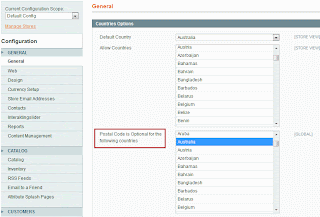


That's it you are done.

Wednesday, October 5, 2011

How to remove right column sidebar from product view page in Magento?

Edit your theme's "/layout/catalog.xml" file. Find the below lines.


You can set your template to 1column like this:
 
or use "<remove name="right"/>" code to remove right sidebar.


After making changes dont forget to refresh the cache. That's it. You are done.

How to remove the Discount Code / Coupon Code box in Magento My cart page?

Solution 1:
Edit your theme's "/layout/checkout.xml" file. Find and Comment the below lines.

Solution 2:
Add new local.xml file under your theme's layout folder.


Here, You no need to search for any template or layout file. This code will do the trick. After making changes dont forget to refresh the cache. That's it. You are done.

How to remove the Estimate Shipping and Tax box in Magento My cart page?

Solution 1:
Edit your theme's "/layout/checkout.xml" file. Find and Comment the below lines.

Solution 2:
Add new "local.xml" file under your theme's layout folder.


Here, You no need to search for any template or layout file. This code will do the trick. After making changes dont forget to refresh the cache. That's it. You are done.

How to Remove Add to Compare link in magento product view page?

Edit your theme's "templae/catalog/product/view/addto.phtml" file. Find and Comment the below lines.
<?php
    $_compareUrl = $this->helper('catalog/product_compare')->getAddUrl($_product);
?>
<?php if($_compareUrl) : ?>
    <li><span class="separator">|</span> <a href="<?php echo $_compareUrl ?>" class="link-compare"><?php echo $this->__('Add to Compare') ?></a></li>
<?php endif; ?> 

Move or Remove Callouts on the left or right sidebar in magento

Edit your theme's "/layout/catalog.xml" file. Fine the below lines.


        images/media/col_left_callout.jpg

        Our customer service is available 24/7. Call us at (555) 555-0123.

        checkout/cart


If you want to remove callout from left sidebar just comment those lines. Suppose you want to show that callout in your right sidebar just change reference name="left" to reference name="right". Likewise you can do it for right sidebar callout.
Remove Your cache and check. Thats it you are done.

How to remove a block from just one page cart, cms or product page?

For page specific layout updates, either you can use backend layout updates sections(category, product, cms pages) or the following code in the "app/etc/local.xml"


for instance, use this code to remove the sidebar cart from the product view page.


How to remove parent category path from sub category in magento URL?

Step 1:
Edit "/app/code/core/Mage/Catalog/Model/Url.php"
Around line 805 comment the below lines:
//if (null === $parentPath) {
//    $parentPath = $this->getResource()->getCategoryParentPath($category);
//}
//elseif ($parentPath == '/') {
    $parentPath = '';
//}
Step 2:
Now re-index Catalog URL Rewrites in Index Management. That's it you are done.

Tuesday, September 20, 2011

How to remove an item from magento shopping cart automatically?

$cartHelper = Mage::helper('checkout/cart');
$items = $cartHelper->getCart()->getItems();
foreach ($items as $item) {
    if ($item->getProduct()->getId() == $productId) {
        $itemId = $item->getItemId();
        $cartHelper->getCart()->removeItem($itemId)->save();
        break;
    }
} 
Note:
The ItemId (ID of an item in the cart) is not the same as the ProductId of the product it represents. Try iterating through the items in the cart until you find the one with the ProductId you want to remove.